> ## Documentation Index
> Fetch the complete documentation index at: https://docs.bookmarkjar.com/llms.txt
> Use this file to discover all available pages before exploring further.
# Cleanup & Duplicates
> Learn how to find and remove duplicate bookmarks using AI-powered cleanup
## Overview
The Cleanup feature helps you maintain a tidy bookmark collection by identifying and removing duplicate or similar bookmarks. It uses multiple detection strategies—from simple URL matching to AI-powered semantic analysis—to find duplicates you might have missed.
 Nothing is deleted until you explicitly approve. All cleanups go through a review process where you can see exactly what will be removed.
## How It Works
1. **Create a Review** — Configure detection methods and filters
2. **Analysis** — The system scans your bookmarks and groups duplicates
3. **Review** — Browse grouped duplicates and choose which to keep
4. **Approve** — Confirm the cleanup to soft-delete duplicates
5. **Restore** (24h) — Accidentally deleted? Restore within 24 hours
## Creating a Cleanup Review
Navigate to **Dashboard → Cleanup** and click **New Review**.
### Detection Methods
Finds bookmarks with identical or nearly identical URLs. This catches:
* Same URL with different formatting (`http://` vs `https://`)
* URLs with/without `www.` prefix
* URLs with trailing slashes removed
* URLs with fragments (`#section`) removed
Finds bookmarks from the same domain with similar content. Useful for catching:
* Same page bookmarked with different tracking parameters (`?utm_source=...`)
* Mobile vs desktop URLs (`m.twitter.com` vs `twitter.com`)
* Domain aliases (`x.com` vs `twitter.com`)
Uses AI embeddings to find bookmarks about the same topic, even if URLs are completely different. Perfect for:
* Same article syndicated across multiple sites
* Similar content with different titles
* Bookmarks covering the same topic from different sources
### Filters
Fine-tune which bookmarks are analyzed:
| Filter | Description |
| ------------------------ | ------------------------------------------------------------ |
| **Exclude Pinned** | Skip bookmarks you've pinned (default: on) |
| **Exclude Protected** | Skip bookmarks marked as protected (default: on) |
| **Older Than X Days** | Only include bookmarks older than a specified number of days |
| **Not Viewed in X Days** | Only include bookmarks you haven't viewed recently |
| **Domains** | Include or exclude specific domains |
## Reviewing Duplicates
After analysis completes, you'll see your duplicates organized into **groups**. Each group contains bookmarks that the system considers duplicates of each other.
Nothing is deleted until you explicitly approve. All cleanups go through a review process where you can see exactly what will be removed.
## How It Works
1. **Create a Review** — Configure detection methods and filters
2. **Analysis** — The system scans your bookmarks and groups duplicates
3. **Review** — Browse grouped duplicates and choose which to keep
4. **Approve** — Confirm the cleanup to soft-delete duplicates
5. **Restore** (24h) — Accidentally deleted? Restore within 24 hours
## Creating a Cleanup Review
Navigate to **Dashboard → Cleanup** and click **New Review**.
### Detection Methods
Finds bookmarks with identical or nearly identical URLs. This catches:
* Same URL with different formatting (`http://` vs `https://`)
* URLs with/without `www.` prefix
* URLs with trailing slashes removed
* URLs with fragments (`#section`) removed
Finds bookmarks from the same domain with similar content. Useful for catching:
* Same page bookmarked with different tracking parameters (`?utm_source=...`)
* Mobile vs desktop URLs (`m.twitter.com` vs `twitter.com`)
* Domain aliases (`x.com` vs `twitter.com`)
Uses AI embeddings to find bookmarks about the same topic, even if URLs are completely different. Perfect for:
* Same article syndicated across multiple sites
* Similar content with different titles
* Bookmarks covering the same topic from different sources
### Filters
Fine-tune which bookmarks are analyzed:
| Filter | Description |
| ------------------------ | ------------------------------------------------------------ |
| **Exclude Pinned** | Skip bookmarks you've pinned (default: on) |
| **Exclude Protected** | Skip bookmarks marked as protected (default: on) |
| **Older Than X Days** | Only include bookmarks older than a specified number of days |
| **Not Viewed in X Days** | Only include bookmarks you haven't viewed recently |
| **Domains** | Include or exclude specific domains |
## Reviewing Duplicates
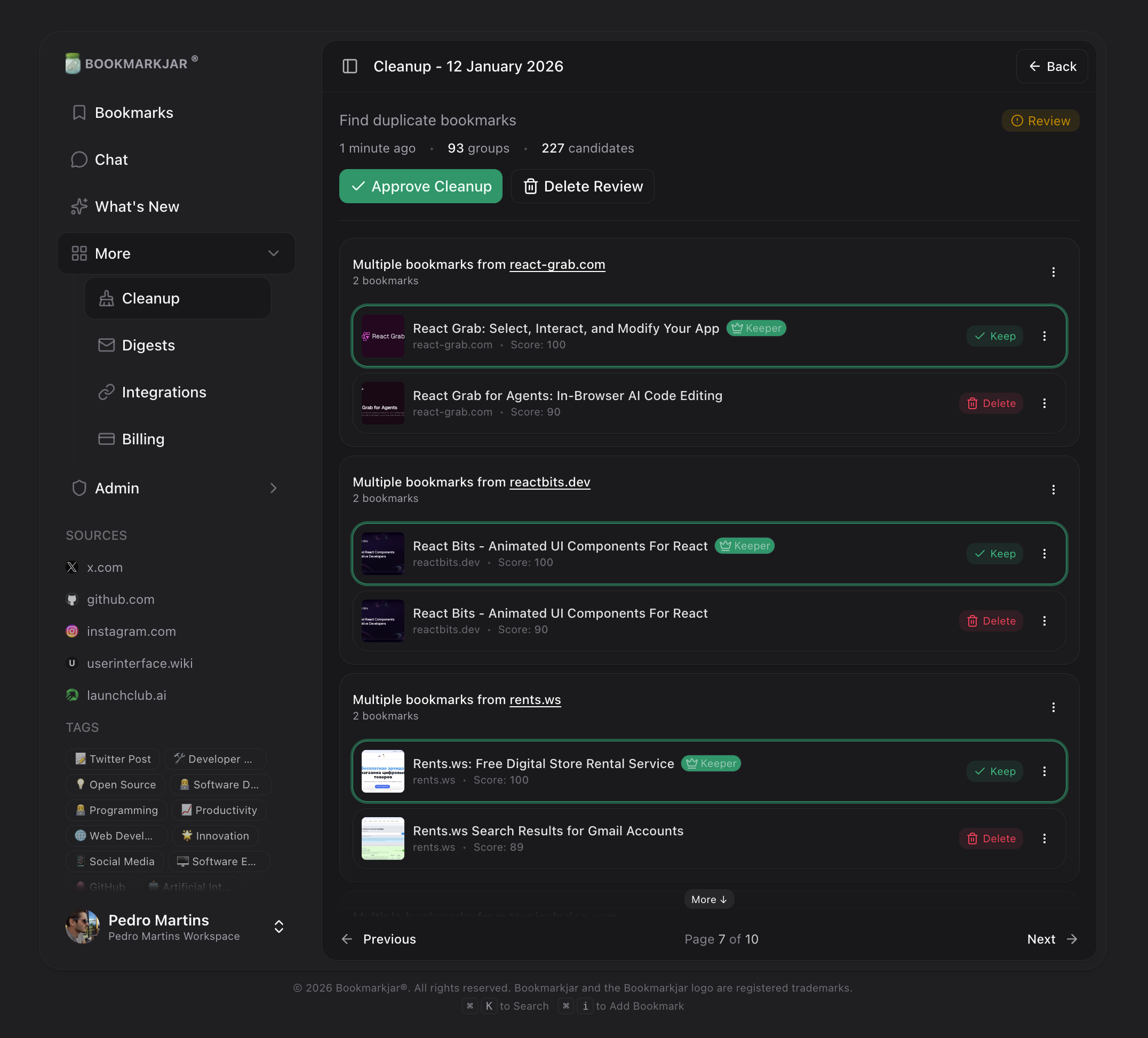
After analysis completes, you'll see your duplicates organized into **groups**. Each group contains bookmarks that the system considers duplicates of each other.
 ### Understanding Groups
Each group shows:
* **Keeper** (marked with a crown) — The bookmark that will be preserved
* **Duplicates** — Other bookmarks in the group that will be deleted
### Changing the Keeper
Don't agree with the suggested keeper? Click any bookmark in the group to set it as the new keeper. The system intelligently picks keepers based on:
* Cleanest URL (no tracking parameters)
* Most complete metadata
* Most recent save date
### Skipping Bookmarks
If you don't want to delete a specific duplicate, you can mark it as "Keep" to exclude it from deletion while keeping the rest of the group's actions intact.
## Approving a Cleanup
Once you've reviewed all groups:
1. Click **Approve Cleanup** at the bottom of the review
2. Confirm the action in the dialog
3. Duplicates are soft-deleted (moved to trash)
Soft-deleted bookmarks are permanently removed after 24 hours. Use the **Deleted** section to restore any mistakes.
## Using Chat for Cleanup
You can also trigger cleanup through the AI chat. Just describe what you want to clean up:
* "Find duplicate bookmarks"
* "Clean up my Twitter bookmarks"
* "Remove bookmarks I haven't viewed in 30 days"
* "Find similar articles about React"
The chat will create a cleanup review based on your request.
## Tips for Best Results
Run exact duplicate detection first—it's fast, accurate, and catches the most obvious duplicates.
Social media URLs often have tracking params. Domain duplicate detection cleans these up nicely.
Premium users: Enable semantic analysis to find topically similar bookmarks across different sources.
Pin or protect bookmarks you never want to delete before running cleanup.
## Frequently Asked Questions
Yes! Deleted bookmarks go to a soft-delete state for 24 hours. Visit **Dashboard → Cleanup → Deleted** to restore them.
Cleanup reviews expire after 7 days if not acted upon. Creating a new review also marks previous pending reviews as expired.
No, AI semantic analysis requires a Premium subscription. Free users can still use URL-based and domain-based detection.
* **Exact duplicates**: 100% accurate (same URL hash)
* **Domain duplicates**: \~95% accurate (URL normalization + content similarity)
* **AI semantic**: \~85-95% accurate (depends on content similarity threshold)
### Understanding Groups
Each group shows:
* **Keeper** (marked with a crown) — The bookmark that will be preserved
* **Duplicates** — Other bookmarks in the group that will be deleted
### Changing the Keeper
Don't agree with the suggested keeper? Click any bookmark in the group to set it as the new keeper. The system intelligently picks keepers based on:
* Cleanest URL (no tracking parameters)
* Most complete metadata
* Most recent save date
### Skipping Bookmarks
If you don't want to delete a specific duplicate, you can mark it as "Keep" to exclude it from deletion while keeping the rest of the group's actions intact.
## Approving a Cleanup
Once you've reviewed all groups:
1. Click **Approve Cleanup** at the bottom of the review
2. Confirm the action in the dialog
3. Duplicates are soft-deleted (moved to trash)
Soft-deleted bookmarks are permanently removed after 24 hours. Use the **Deleted** section to restore any mistakes.
## Using Chat for Cleanup
You can also trigger cleanup through the AI chat. Just describe what you want to clean up:
* "Find duplicate bookmarks"
* "Clean up my Twitter bookmarks"
* "Remove bookmarks I haven't viewed in 30 days"
* "Find similar articles about React"
The chat will create a cleanup review based on your request.
## Tips for Best Results
Run exact duplicate detection first—it's fast, accurate, and catches the most obvious duplicates.
Social media URLs often have tracking params. Domain duplicate detection cleans these up nicely.
Premium users: Enable semantic analysis to find topically similar bookmarks across different sources.
Pin or protect bookmarks you never want to delete before running cleanup.
## Frequently Asked Questions
Yes! Deleted bookmarks go to a soft-delete state for 24 hours. Visit **Dashboard → Cleanup → Deleted** to restore them.
Cleanup reviews expire after 7 days if not acted upon. Creating a new review also marks previous pending reviews as expired.
No, AI semantic analysis requires a Premium subscription. Free users can still use URL-based and domain-based detection.
* **Exact duplicates**: 100% accurate (same URL hash)
* **Domain duplicates**: \~95% accurate (URL normalization + content similarity)
* **AI semantic**: \~85-95% accurate (depends on content similarity threshold)