> ## Documentation Index
> Fetch the complete documentation index at: https://docs.bookmarkjar.com/llms.txt
> Use this file to discover all available pages before exploring further.
# Digests
> Receive AI-powered summaries of your bookmarks on a schedule
## Overview
Digests deliver curated summaries of your recently saved bookmarks directly to your inbox. Instead of manually browsing through everything you've saved, get a concise recap highlighting what matters most.
 Digests are a **Pro feature**. Upgrade to receive scheduled bookmark summaries.
## How It Works
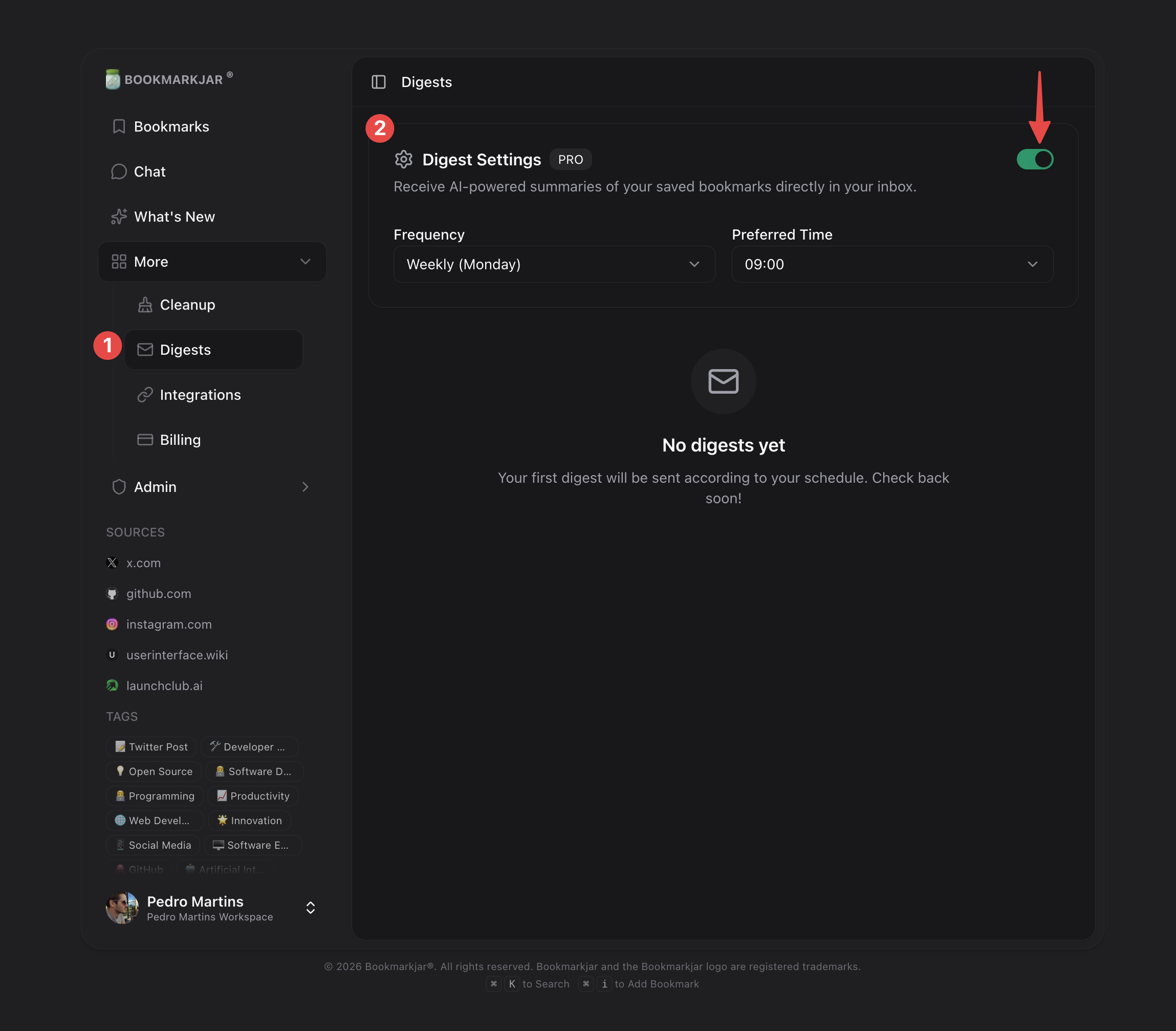
1. **Enable Digests** — Toggle on from the Digests page
2. **Choose Frequency** — Weekly, monthly, bimonthly, or quarterly
3. **Set Delivery Time** — Pick when you want to receive your digest
4. **Receive Summaries** — AI analyzes your recent bookmarks and sends a curated email
## Setting Up Digests
Navigate to **Dashboard → Digests** to configure your preferences.
### Frequency Options
| Frequency | Best For |
| ------------- | -------------------------------------------- |
| **Weekly** | Heavy users who save 20+ bookmarks per week |
| **Monthly** | Regular users who want a monthly recap |
| **Bimonthly** | Casual users with moderate bookmark activity |
| **Quarterly** | Light users who prefer occasional summaries |
### Delivery Preferences
* **Preferred Time** — Choose your ideal delivery hour (e.g., 9:00 AM)
* **Timezone** — Set your local timezone for accurate delivery
Schedule digests for Monday mornings to start your week with a recap of what you saved.
## What's Included in a Digest
Each digest contains:
* **Bookmark Count** — Total bookmarks saved since last digest
* **Top Categories** — Most common topics from your saves
* **Highlighted Items** — AI-picked notable bookmarks with summaries
* **Quick Links** — Direct links to view full bookmarks in your dashboard
## Digest History
View all your past digests from the **History** section. Each entry shows:
| Status | Meaning |
| -------------- | -------------------------------------- |
| **Sent** | Successfully delivered to your email |
| **Pending** | Scheduled and waiting to be processed |
| **Processing** | Currently being generated |
| **Failed** | Delivery failed (check email settings) |
## Tips for Better Digests
The more bookmarks you save, the richer your digest summaries become.
Tagged bookmarks help the AI categorize content more accurately in your digest.
## Frequently Asked Questions
No, digests require a Pro subscription. Free users can still browse and search all their bookmarks manually.
If you haven't saved anything since your last digest, you'll receive a brief "no new bookmarks" notification instead of an empty digest.
Yes! Update your frequency anytime from the Digests settings. The change takes effect from your next scheduled digest.
Check your spam folder first. If it's not there, verify your email in account settings and ensure digests are enabled. Failed deliveries appear in your digest history.
Digests are a **Pro feature**. Upgrade to receive scheduled bookmark summaries.
## How It Works
1. **Enable Digests** — Toggle on from the Digests page
2. **Choose Frequency** — Weekly, monthly, bimonthly, or quarterly
3. **Set Delivery Time** — Pick when you want to receive your digest
4. **Receive Summaries** — AI analyzes your recent bookmarks and sends a curated email
## Setting Up Digests
Navigate to **Dashboard → Digests** to configure your preferences.
### Frequency Options
| Frequency | Best For |
| ------------- | -------------------------------------------- |
| **Weekly** | Heavy users who save 20+ bookmarks per week |
| **Monthly** | Regular users who want a monthly recap |
| **Bimonthly** | Casual users with moderate bookmark activity |
| **Quarterly** | Light users who prefer occasional summaries |
### Delivery Preferences
* **Preferred Time** — Choose your ideal delivery hour (e.g., 9:00 AM)
* **Timezone** — Set your local timezone for accurate delivery
Schedule digests for Monday mornings to start your week with a recap of what you saved.
## What's Included in a Digest
Each digest contains:
* **Bookmark Count** — Total bookmarks saved since last digest
* **Top Categories** — Most common topics from your saves
* **Highlighted Items** — AI-picked notable bookmarks with summaries
* **Quick Links** — Direct links to view full bookmarks in your dashboard
## Digest History
View all your past digests from the **History** section. Each entry shows:
| Status | Meaning |
| -------------- | -------------------------------------- |
| **Sent** | Successfully delivered to your email |
| **Pending** | Scheduled and waiting to be processed |
| **Processing** | Currently being generated |
| **Failed** | Delivery failed (check email settings) |
## Tips for Better Digests
The more bookmarks you save, the richer your digest summaries become.
Tagged bookmarks help the AI categorize content more accurately in your digest.
## Frequently Asked Questions
No, digests require a Pro subscription. Free users can still browse and search all their bookmarks manually.
If you haven't saved anything since your last digest, you'll receive a brief "no new bookmarks" notification instead of an empty digest.
Yes! Update your frequency anytime from the Digests settings. The change takes effect from your next scheduled digest.
Check your spam folder first. If it's not there, verify your email in account settings and ensure digests are enabled. Failed deliveries appear in your digest history.