

Overview
The Cleanup feature helps you maintain a tidy bookmark collection by identifying and removing duplicate or similar bookmarks. It uses multiple detection strategies—from simple URL matching to AI-powered semantic analysis—to find duplicates you might have missed.
Nothing is deleted until you explicitly approve. All cleanups go through a review process where you can see exactly what will be removed.
How It Works
- Create a Review — Configure detection methods and filters
- Analysis — The system scans your bookmarks and groups duplicates
- Review — Browse grouped duplicates and choose which to keep
- Approve — Confirm the cleanup to soft-delete duplicates
- Restore (24h) — Accidentally deleted? Restore within 24 hours
Creating a Cleanup Review
Navigate to Dashboard → Cleanup and click New Review.Detection Methods
Exact Duplicates (Free)
Exact Duplicates (Free)
Finds bookmarks with identical or nearly identical URLs. This catches:
- Same URL with different formatting (
http://vshttps://) - URLs with/without
www.prefix - URLs with trailing slashes removed
- URLs with fragments (
#section) removed
Domain Duplicates (Free)
Domain Duplicates (Free)
Finds bookmarks from the same domain with similar content. Useful for catching:
- Same page bookmarked with different tracking parameters (
?utm_source=...) - Mobile vs desktop URLs (
m.twitter.comvstwitter.com) - Domain aliases (
x.comvstwitter.com)
Filters
Fine-tune which bookmarks are analyzed:Reviewing Duplicates
After analysis completes, you’ll see your duplicates organized into groups. Each group contains bookmarks that the system considers duplicates of each other.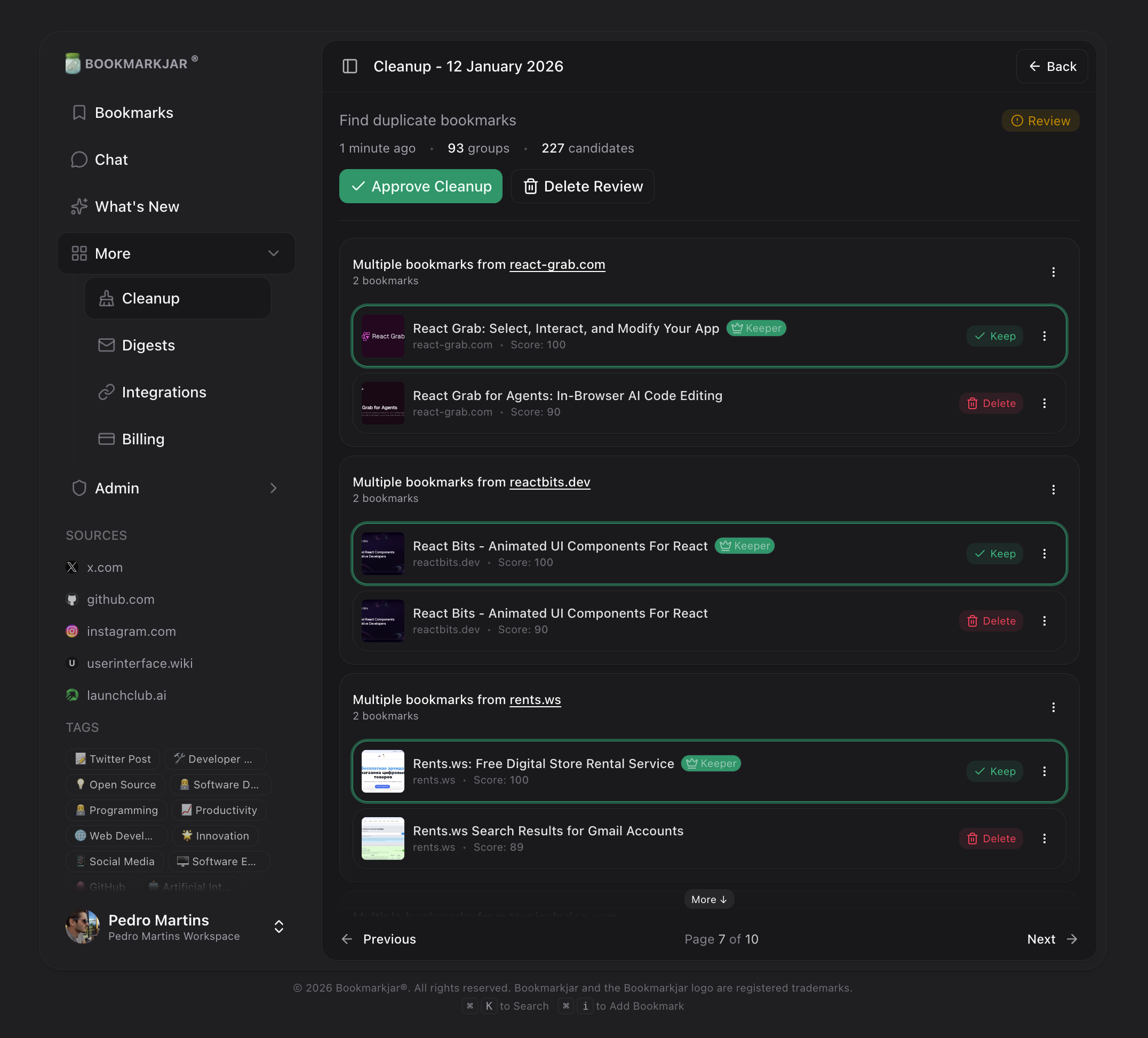
Understanding Groups
Each group shows:- Keeper (marked with a crown) — The bookmark that will be preserved
- Duplicates — Other bookmarks in the group that will be deleted
Changing the Keeper
Don’t agree with the suggested keeper? Click any bookmark in the group to set it as the new keeper. The system intelligently picks keepers based on:- Cleanest URL (no tracking parameters)
- Most complete metadata
- Most recent save date
Skipping Bookmarks
If you don’t want to delete a specific duplicate, you can mark it as “Keep” to exclude it from deletion while keeping the rest of the group’s actions intact.Approving a Cleanup
Once you’ve reviewed all groups:- Click Approve Cleanup at the bottom of the review
- Confirm the action in the dialog
- Duplicates are soft-deleted (moved to trash)
Using Chat for Cleanup
You can also trigger cleanup through the AI chat. Just describe what you want to clean up:- “Find duplicate bookmarks”
- “Clean up my Twitter bookmarks”
- “Remove bookmarks I haven’t viewed in 30 days”
- “Find similar articles about React”
Tips for Best Results
Start with Exact Duplicates
Run exact duplicate detection first—it’s fast, accurate, and catches the most obvious duplicates.
Use Domain Duplicates for Social Media
Social media URLs often have tracking params. Domain duplicate detection cleans these up nicely.
AI Analysis for Deep Cleaning
Premium users: Enable semantic analysis to find topically similar bookmarks across different sources.
Exclude Important Bookmarks
Pin or protect bookmarks you never want to delete before running cleanup.
Frequently Asked Questions
Can I undo a cleanup?
Can I undo a cleanup?
Yes! Deleted bookmarks go to a soft-delete state for 24 hours. Visit Dashboard → Cleanup → Deleted to restore them.
What happens to old reviews?
What happens to old reviews?
Cleanup reviews expire after 7 days if not acted upon. Creating a new review also marks previous pending reviews as expired.
Is semantic analysis available on the free plan?
Is semantic analysis available on the free plan?
No, AI semantic analysis requires a Premium subscription. Free users can still use URL-based and domain-based detection.
How accurate is the duplicate detection?
How accurate is the duplicate detection?
- Exact duplicates: 100% accurate (same URL hash)
- Domain duplicates: ~95% accurate (URL normalization + content similarity)
- AI semantic: ~85-95% accurate (depends on content similarity threshold)